Getting Started
Drag the Dgi_Visionary Solutions Series4 Module (not the underlying SIMPL+ module) to your project.
- Add the device's IP address to the bottom parameter.
- Leave the Port to its default value of 8000.
- Start listening and polling by driving the
Registerinput high. Best practice is to delay theRegisterinput for a second before the program starts.
Polling
The module will start polling the device immediatly upon registration. It will stop polling when unregistered. However it is possible to stop polling (for debugging purposes for example, or if not needed) by driving the Stop Polling input low.
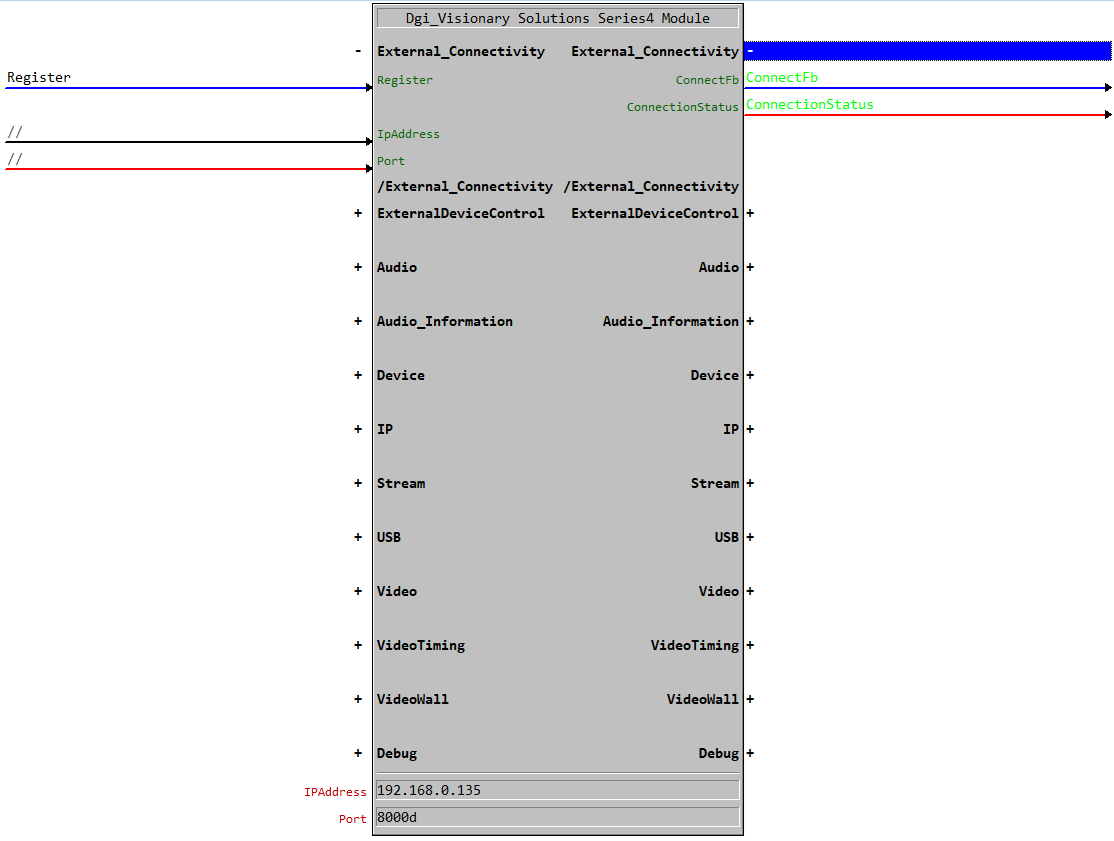
You can get feedback from the connection by monitoring the Connected output. This will be high when the module is connected to the device and low when it is not.
More details connection information can be gathered from the Connection Status Symbol, which will output the following information:
- SOCKET_STATUS_NO_CONNECT = 0
- SOCKET_STATUS_WAITING = 1
- SOCKET_STATUS_CONNECTED = 2
- SOCKET_STATUS_CONNECT_FAILED = 3
- SOCKET_STATUS_BROKEN_REMOTELY = 4
- SOCKET_STATUS_BROKEN_LOCALLY = 5
- SOCKET_STATUS_DNS_LOOKUP = 6
- SOCKET_STATUS_DNS_FAILED = 7
- SOCKET_STATUS_DNS_RESOLVED = 8
- SOCKET_STATUS_LINK_LOST = 9
- SOCKET_STATUS_SOCKET_NOT_EXIST = 10