Usage
When the program runs, a message to console in Appliances or Error Log in Servers will be displayed showing the Configuration Server full address and the Confiration File Path.
The server will have an address with this pattern:
http://[IP ADDRESS]:[Port]/config.
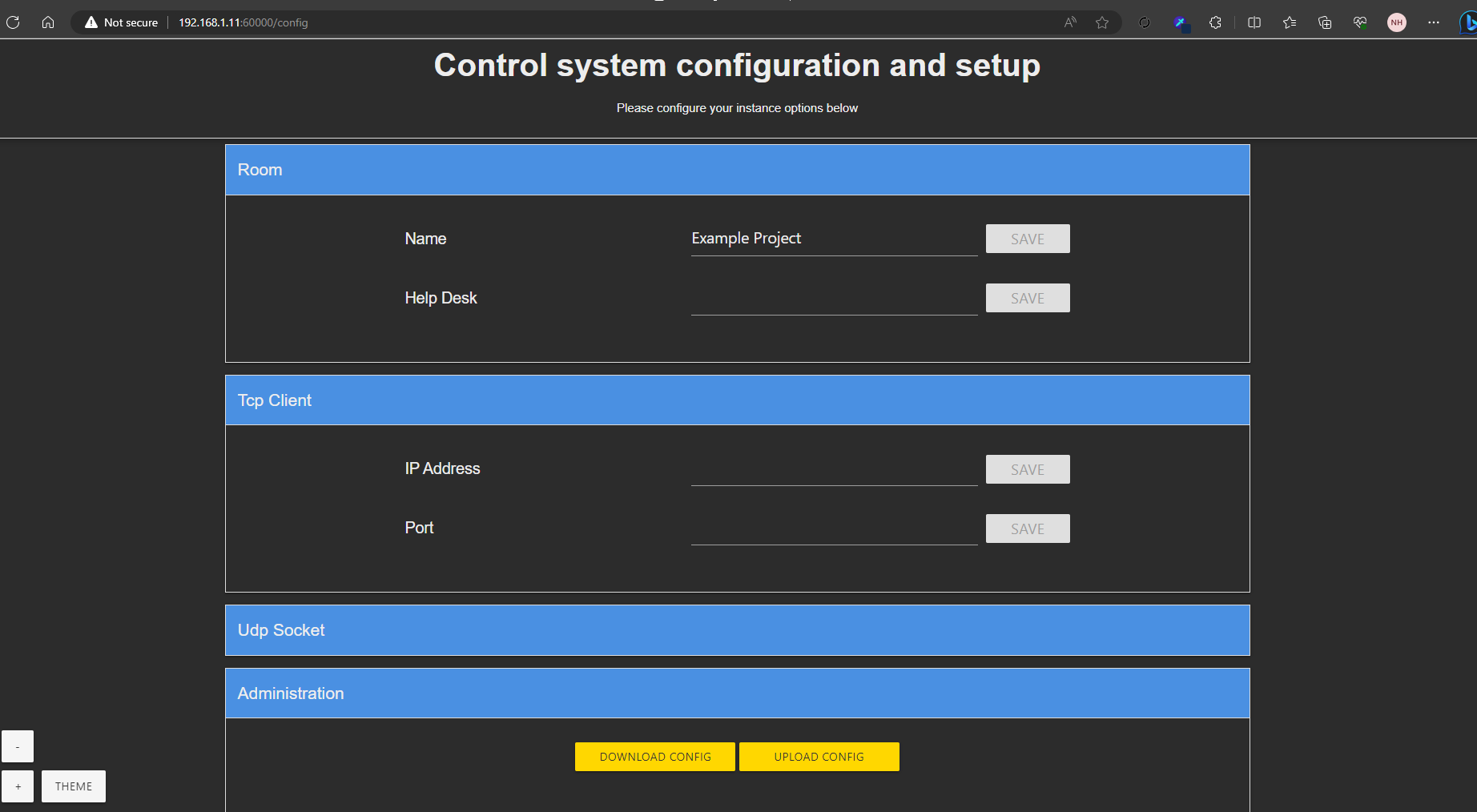
Navigating to this page, you will see a form with options to input or alter configuration parameters. Expand any group to modify any individual parameter.
save: As you make changes in each field, you will notice that this button becomes available for that particular field. This gives you the flexibility to save changes instantly as you go through each configuration parameter. The updated value will be pushed to the underlying project.
Download Config: Once you have completed modifying all necessary fields, select the option to download a new JSON file containing the complete updated configurations.
Upload Config: If you wish to load previously saved configurations, navigate to the section and there you can upload your saved JSON files. The server parameters will automatically be updated to match the uploaded configurations. Note that any parameter that does not exist in the project, will be ignored. Also any parameter that exists in the project, but not in the file, will be left witht he initial value set in the project.
Special Usage
It is possible to create a custom Parameter Module that will ascept several parameters. This should ease the creation of multiple parameters in large projects, for example several microphone names. And example of such a module would be something like this:
#DEFAULT_VOLATILE
#ENABLE_STACK_CHECKING
#ENABLE_TRACE

#USER_SIMPLSHARP_LIBRARY "Dgi_SimplConfigurationManagerDriver"

String_Output NVXEncoderNames[25];
String_Output _SKIP_;
String_Output NVXDecoderNames[20, 20];

SimplConfigurationManagerDriver _server;
String Encoders[10][255];

EventHandler OnValueEvent(SimplConfigurationManagerDriver sender, FieldUpdatedEventArgs args) {
	Integer i, maxCount;

	if (args.Group = "NVX Encoder Names") {
		maxCount = GetNumArrayRows(Encoders);
		for (i = 1 to maxCount) {
			if (Find(args.Label, Encoders[i]) > 0) {
				Trace("Updating Encoders Index [%d] with [%s]\r", i, args.Value);
				NVXEncoderNames[i] = args.Value;
				break;
			}
		}
	}
}

Function Main() {

	integer I, MaxCount;
	String Group[100];
	String Name[100];
	String InitialValue[100];
	String ParsedString[255];

	RegisterEvent(_server, ValueEvent, OnValueEvent);

	Encoders[1] = "Lectern Laptop,Lectern Laptop,NVX Encoder Names";
	Encoders[2] = "Lectern PC,Lectern PC,NVX Encoder Names";
	Encoders[3] = "Floater 1,Floater 1,NVX Encoder Names";
	Encoders[4] = "Floater 2,Floater 2,NVX Encoder Names";
	Encoders[5] = "Floater 3,Floater 3,NVX Encoder Names";
	Encoders[6] = "Booth Laptop 1,Booth Laptop 1,NVX Encoder Names";
	Encoders[7] = "Booth Laptop 2,Booth Laptop 2,NVX Encoder Names";
	Encoders[8] = "Booth Laptop 3,Booth Laptop 3,NVX Encoder Names";
	Encoders[9] = "Mac Mini,Mac Mini,NVX Encoder Names";
	Encoders[10] = "Proj Laptop,Proj Laptop,NVX Encoder Names";


	MaxCount = GetNumArrayRows(Encoders);
	For (i = 1 to MaxCount) {
		ParsedString = Encoders[i];
		Name = Remove(",", ParsedString);
		Name = Left(Name, Len(Name) - 1);
		InitialValue = Remove(",", ParsedString);
		InitialValue = Left(InitialValue, Len(InitialValue) - 1);
		Group = ParsedString;
		_server.RegisterParameter(Group, Name, InitialValue);
	}
}